Renovation Budget Template: Free Spreadsheet for Every Phase
Most renovation budgets fail in the same three ways: missing line items, no contingency, and a spreadsheet that nobody opens after week two. This template fixes all three — and it's free.
The full template — categories, line items, and a contingency formula — is laid out in this post so you can recreate it in any spreadsheet tool (Google Sheets, Excel, Numbers) in about 10 minutes. A polished printable PDF and pre-built Google Sheet copy are coming shortly and will be linked here.
If you’d rather skip the spreadsheet entirely, the same category structure belongs in whatever phone-first tool you will actually open on site.
Why most renovation budget templates fail
I’ve looked at probably forty free renovation budget templates floating around the web. Most fall into one of two camps:
- Single-sum templates. One row for “kitchen renovation: $25,000”. Useless the moment you’re standing in a tile shop trying to figure out if you can afford the porcelain instead of ceramic.
- Hyper-detailed templates with 400 rows. Useless for the opposite reason — nobody fills them in. They become a graveyard of empty cells.
A budget template needs to sit in a sweet spot: detailed enough to catch overruns at the line-item level, simple enough that you actually maintain it through twelve weeks of dust and decision fatigue.
The template I’m sharing below is the one I built for myself after two of my own renovations and looking at the spreadsheets of about a dozen friends. It has 9 categories, ~50 typical line items pre-filled (you delete the ones you don’t need), and a contingency calculator that updates as you go.
The 9 cost categories you actually need
Most templates have 3–4. The ones below are where renovators consistently lose track of money. If you haven’t set a total figure yet, work through how to budget a home renovation first — the categories are only useful once you know roughly what the whole job is worth to you:
1. Design & permits
- Architect / designer fees
- Building permit
- Engineering reports (structural, soil)
- Heritage consent (older homes)
- Inspection fees
Why it matters: These hit early, when you’re optimistic. Easy to forget they’re a separate budget category and not “overhead.”
2. Demolition & disposal
- Skip / dumpster hire
- Hazardous material handling (asbestos in homes built before 1990 in most countries)
- Removal of old appliances
- Site protection materials
Why it matters: First “surprise” cost on most projects. People treat demolition as free because they’re doing it themselves — and forget the skip costs $400 and you need three of them.
3. Structural & shell
- Carpentry / framing
- Steel beams or load-bearing changes
- Roofing
- Insulation
- Drywall / plasterboard
4. Mechanical, electrical, plumbing (MEP)
- Electrician (rough-in + final)
- Plumber (rough-in + final)
- HVAC modifications
- Smart home wiring (often forgotten)
- Permits specific to MEP
5. Finishes
- Flooring (material + installation, often quoted separately)
- Tile (wall, floor, splashbacks)
- Paint (primer + topcoat + labour)
- Trim, skirting, architrave
6. Fixtures & fittings
- Kitchen cabinets + benchtop + appliances
- Bathroom suite + tapware
- Light fittings
- Door hardware
- Window treatments
7. Furniture & decoration
- Often dismissed as “later” — then suddenly you’re sitting on packing crates because the budget had no room for a sofa.
8. Finance & opportunity cost
- Loan interest during the build
- Temporary accommodation if you’ve moved out
- Storage costs
- Time off work (yours, for site visits and decisions)
9. Contingency
- A line. Not an afterthought.
The template has all nine pre-populated with typical line items. You’ll add and delete; the structure stays.
The 20% rule, explained
There’s a folk-rule that you should budget 10% contingency. That’s wrong for renovations. It’s a number borrowed from new construction, where the site is a blank slab and there are few unknowns. How a renovation contingency budget actually works goes into why the right figure depends on the age and condition of the house.
Renovations are the opposite. The unknowns are the entire reason renovations cost more than expected. Wiring that’s not to code. Joists that have rot. A wall that’s actually load-bearing. A drain that runs the opposite direction to what’s on the plans.
My rule of thumb, validated against my own projects and others I’ve studied:
| Home age | Recommended contingency |
|---|---|
| Built after 2000 | 15% |
| Built 1990–2000 | 18% |
| Built 1970–1990 | 20% |
| Built 1950–1970 | 22% |
| Built before 1950 | 25% |
| Known issues (subsidence, dampness) | 30% |
These look high. They are exactly the percentages by which the average renovation goes over budget when contingency isn’t set this high. The numbers are the same problem viewed from two sides.
The included template has a single cell for contingency percentage at the top. Change it once, every category updates. That’s it.
Download the template
All nine categories, pre-populated with the line items above, with the contingency cell already wired to the totals. No email, no signup — it just downloads.
- Renovation budget template (XLSX) — contingency cell drives the totals, plus a per-category summary sheet.
- Same thing as a CSV — plain, opens in anything, no formulas.
How to use the template (5-minute setup)
- Open the sheet. Nine columns: Category, Item, Supplier, Low quote, Mid quote, High quote, Actual paid, Date paid, VAT. One row per line item. If you would rather build your own, those columns are the whole structure.
- Delete what doesn’t apply. The 9 categories above are already filled in with their typical line items. Most projects use maybe two-thirds of them — cut the rest.
- Get three contractor quotes per major trade and enter them in the Low / Mid / High columns. Use the Mid for your working budget; the range stays visible for negotiation.
- Set your contingency at the top of the sheet as a single percentage cell (e.g. cell B3 = 0.20 for 20%). Reference it in a “contingency budget” formula at the bottom:
=SUM(midQuotes) * B3. - Log actuals as they happen. Not weekly — as they happen. Every receipt, every transfer, every invoice. Three days of “I’ll catch up Sunday” and you’ve lost the thread.
The “actuals as they happen” rule is the only one that matters. Everything else is just structure.
When the spreadsheet stops working
I’ll be honest: this template is great until about week four of a real renovation.
Then the dust starts. Decisions multiply. You’re at a tile shop, you’re at the builder’s merchant, you’re approving a contractor invoice on your phone while standing in your half-demolished kitchen. The spreadsheet — even on your phone — is too clumsy to update in real time. So you stop. Then the budget stops being accurate. Then it stops being useful. It’s a common enough pattern that it’s worth reading about why renovation spreadsheets break down before you rely on one for a long project.
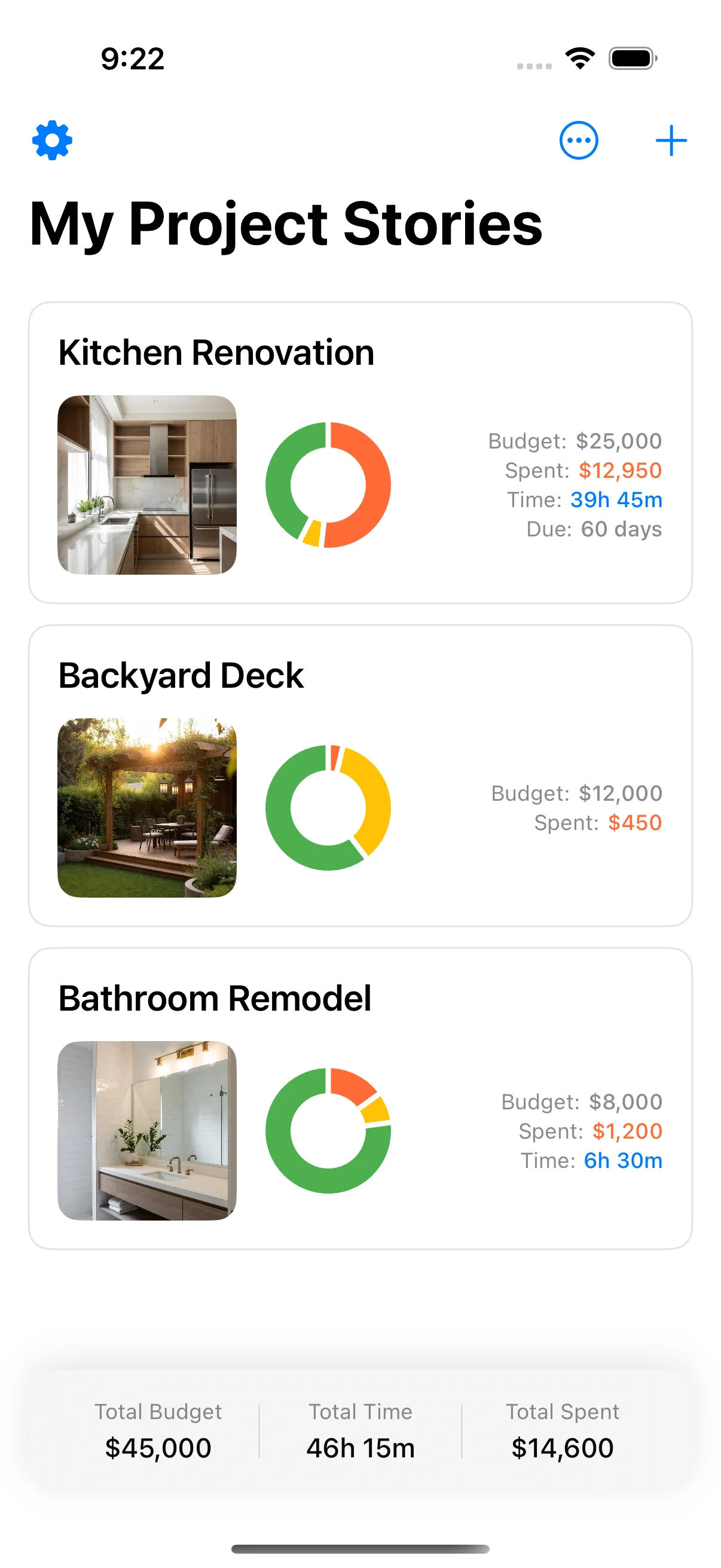
This is the exact problem I was trying to solve when I built Home Stories — a free app for iPhone and iPad that does what the spreadsheet does, plus:
- Adds line items by typing or voice in 5 seconds (vs. opening a sheet, finding the row, tapping the cell)
- Attaches a receipt photo to every cost as you log it (essential for tax and warranty claims)
- Keeps a running total as you log. The budget-vs-actual chart is part of Pro
- Exports a PDF of the project when you’re done — that export is part of Pro
It uses the same 9-category structure as the template. If you start on the spreadsheet and migrate to the app at week 4, your categories carry across.
Common mistakes the template prevents
1. Pricing in haste. The template forces a Low/Mid/High column per item. Forces you to get three quotes before committing.
2. “Approximately.” No “approx” allowed — every cell is a number. Approximate budgets become approximately wrong budgets.
3. Mid-project re-budgeting. When you go over on cabinets and pull the money from “contingency”, you log it in the contingency-drawn column. The template shows you remaining contingency in red when it drops below 5%. That’s the warning sign that you need to cut scope, not borrow.
4. Forgetting VAT/sales tax. Separate column. Toggle on/off. Tax-inclusive and tax-exclusive views.
5. Not tracking who you paid. Final column = supplier. Sounds petty until you’re chasing a warranty claim two years later.
What’s next
Polished PDF and Google Sheet copies of this template are in preparation and will be linked at the top of this post when ready. In the meantime, the structure above is everything you need to set it up in any spreadsheet tool.
If you’d rather skip the spreadsheet entirely, Home Stories is free on the App Store. Same 9 categories, same contingency logic, but you can log a receipt in 5 seconds at the builder’s merchant.
Either way: get the structure right, get the contingency right, and log actuals the day they happen. That’s 80% of the battle.
A template is the plan; how to track home improvement expenses is the day-to-day method once money starts moving.
Sources and further reading
The ranges and guidance above are drawn from direct project experience and from the bodies below, which publish the underlying standards, rules and market data. They are worth reading directly before you commit money.
- Housing economics and remodeling market data — National Association of Home Builders
- Houzz & Home study — renovation spend and scope data — Houzz
- Home improvements and repairs — US Dept. of Housing and Urban Development
Frequently asked questions
How much should I budget for a home renovation?
There's no useful answer in dollars per square metre because finishes, region, and scope vary too much. The right approach: get three contractor quotes for each major trade, sum them, then add 20% contingency. For DIY projects, multiply your material list cost by 1.3 to cover waste and forgotten items.
What's the biggest mistake people make in renovation budgets?
Treating the contractor's quote as the budget. The quote is one line item. A real budget also includes permits, design fees, appliances, fixtures, decoration, finance/loan costs, demolition disposal, temporary living costs (if you move out), and contingency. These commonly add 30–50% on top of the quoted construction work.
Should I use a spreadsheet or an app for my renovation budget?
Spreadsheets work for planning. They stop working the moment you're at a builder's merchant trying to log a receipt with one hand. For a 6+ week project with more than ~50 line items, an app you can use on-site with your phone (like Home Stories) keeps the numbers current — which is the whole point.
What's a realistic contingency percentage for a renovation?
20% for homes built before 1990 (more surprises behind the walls), 15% for newer homes, 25% if the structure has known issues. Only drop below 15% if you've done the demolition yourself and verified there are no surprises.
Do I need to track VAT separately in my renovation budget?
Yes if you might claim it back (rental properties in many jurisdictions) or if you're comparing quotes — some contractors quote ex-VAT, others incl. Build VAT as its own column in the template so you can toggle the view. The included sheet has this column.
Keep reading

How to Budget a Home Renovation: 7 Steps to an Honest Budget
How to budget a home renovation — 7 steps to build an honest budget that covers scope, contingency, and every hidden cost.
Renovation Checklist Printable: Your Complete Step-by-Step Guide
Renovation checklist printable — a complete step-by-step renovation checklist you can use to plan and track every phase.

Renovation Spreadsheet Alternative: Why Apps Beat Spreadsheets
Renovation spreadsheet alternative — why apps beat spreadsheets for tracking renovation costs, receipts, and decisions on-site.