Renovation Spreadsheet Alternative: Why Apps Beat Spreadsheets
Every renovator starts with a spreadsheet. Most abandon it by week three. The reasons are predictable, repeatable, and not about the spreadsheet — they're about renovation reality.
There’s a quiet pattern in every renovation project. It goes like this.
Week 1: You set up the spreadsheet. You’re proud of it. There are tabs for budget, tasks, contractors, and inspiration. You colour-code the rows. Your partner sees it and is impressed.
Week 2: You’re updating it every evening. You’ve added a “potential costs” column. The spreadsheet is humming.
Week 3: You forget to log Tuesday’s tile purchase because you were at the shop, not at your desk. You think “I’ll catch up Sunday”.
Week 4: Sunday comes. You can’t remember which receipt was which. You enter a “miscellaneous” line for $847 and tell yourself it’s fine.
Week 5: The spreadsheet is two weeks behind. You stop opening it.
Week 8: You’re $4,000 over and you don’t know where it went.
I have run this exact pattern twice. I’ve watched friends run it. The spreadsheet isn’t the failure — the friction of using it on a building site is the failure. Let’s break down where, exactly, the wheels come off.
The five breakdown points
1. The receipt logging gap
You’re at a builder’s merchant. You’ve bought 12 things. The checkout person hands you a paper receipt and an emailed PDF. You leave, drive home, get a phone call about a delivery, then a contractor question, then dinner.
By the time you sit at your laptop, that receipt is somewhere. Maybe in your pocket. Maybe in the truck. Maybe in the email. You add a row for “builder’s merchant — approx $340” and move on.
You just lost the line-item visibility that was the entire point of the spreadsheet.
An app fixes this by letting you log the receipt in 15 seconds at the checkout, with a photo of the receipt attached.
2. The photo orphaning problem
A spreadsheet can hold a =HYPERLINK() to a Dropbox photo. In theory. In practice, nobody does this. Photos pile up in your camera roll, dated but uncategorised. Six months later, when you’re trying to remember which tile you used in the second bathroom, you scroll through 3,200 photos.
The photo and the line item exist in two different worlds. The renovation reality is that they belong together.
An app fixes this by attaching photos to the line item or task as part of one workflow.
3. The “on-site one-handed” problem
Renovation work happens in dusty, hands-busy, ambient-noise environments. You need to log a cost while holding a tape measure. Update a task status while talking to a plumber. Make a quick note about a defect.
Spreadsheets are inherently two-handed, focused-attention tools. Even the mobile versions of Excel and Google Sheets require finding the right cell, tapping it, typing precisely, hitting enter. Forty seconds of focused attention per row.
That’s the wrong tool for a build site.
An app fixes this with quick-entry forms designed for thumb-tapping while standing.
4. The contractor handoff problem
You want to share the project status with your contractor. Or your insurer. Or, eventually, the next owner of the house.
A spreadsheet shares as a spreadsheet — which assumes the recipient knows what they’re looking at. Half the contractors I’ve worked with don’t routinely open Excel files; they want a PDF. So you screenshot. Or export. Or describe what’s in there over the phone.
An app built for the site keeps the record in one project. A PDF of that record — budget, tasks, photos and notes — is part of Pro.
5. The “is this current?” problem
Three months into a renovation, you open the spreadsheet. Is the data current? Is that “$2,400 — kitchen cabinets” the deposit, the final, or both? Did you ever add the upgrade to soft-close hinges?
Without a structured timeline of edits — who logged what, when — the spreadsheet becomes a snapshot of the past, not a tracker of the present. You spend 20 minutes auditing yourself just to trust the numbers.
An app fixes this by stamping every entry with a date and (optionally) a category and surfacing recent changes at the top.
What “an app” actually does differently
Concretely, here’s what changes with a renovation-specific app:
| Task | In a spreadsheet | In a renovation app |
|---|---|---|
| Log a receipt at the shop | 60+ seconds, two-handed | 10 seconds, one-handed, photo attached |
| Mark a task done | Find row, tap cell, type “done” | Tap the checkbox |
| Check budget remaining | Open file, find tab, find row, do mental math | Open app, see the running total |
| Attach a defect photo | Take photo, switch app, find row, paste link | Tap ”+ photo” on the task |
| Share status with contractor | Export, screenshot, email, explain | With Pro, a PDF you can hand over |
The total time saved per logging event is small — maybe 30 seconds. But it’s the threshold that matters. A 10-second logging task gets done. A 60-second one gets postponed.
What you keep from the spreadsheet
If you’ve started with a spreadsheet (and you should — for planning), it’s not wasted work when you switch:
- Line item structure transfers directly. The 9 standard categories (see our budget template post) are the same in any tool.
- Contractor quotes and contact info can sit in a “Project notes” field in the app, or stay in the original spreadsheet as a reference document.
- Contingency calculation carries across — set the same percentage.
- The act of having thought through every line item once is the real value. The tool change just keeps that work alive.
When a spreadsheet is the right answer
Notion sits in the same planning-strong / site-weak camp — Notion for home renovation spells out the trade-off.
When it stops being the right answer, how to track home improvement expenses compares the methods people actually sustain.
Three cases where I’d stick with a spreadsheet:
- Planning-only phase. Before contractors are hired and demolition starts, you’re in research mode. A spreadsheet — or Notion, or Airtable — is great for that.
- Tiny projects. Replacing a single bathroom suite with a single contractor in two weeks. Spreadsheet is fine.
- You’ll genuinely sit at a desk and log every night. Some people do. If that’s you, the spreadsheet’s friction never compounds.
For everything else — multi-week, multi-trade, mobile-life, on-site decisions — the app comparison wins on logging speed alone, and the cascade of consequences (current data, attached photos, easier handoff) compounds from there.
What should a renovation spreadsheet alternative actually cover?
If you are shopping for a renovation spreadsheet alternative, ignore feature lists that sound like a full ERP. You need a short list that maps to the moments where spreadsheets die:
- Budget vs actual with categories you already use (design, demolition, structure, MEP, finishes, fixtures, contingency).
- Committed money separate from spent — signed quotes and deposits that have not left the account yet.
- Photos and documents attached to the same project as the money (quotes, contracts, receipts).
- Tasks and a rough sequence so a slipped trade date is visible.
- Export — a PDF or shareable summary for a contractor, insurer, or future you.
Anything beyond that is optional. Warranty databases and whole-home asset inventories are useful for some households; they are not what saves a mid-renovation budget.
A worked example of the logging threshold (illustrative): logging twelve line items from a merchant run takes about twelve minutes in a spreadsheet if you are careful with categories, and about two minutes in a phone form with a receipt photo. Over a twelve-week project with three merchant runs a week, that is roughly seven hours versus under two hours — and more importantly, the spreadsheet version is the one people skip. The skipped hours are where “$847 miscellaneous” comes from.
If your project is still in planning, keep the spreadsheet. Use the renovation budget template to force the category structure once. When execution starts, move the open line items into whatever tool you will actually open on site. For the habits that matter once walls open, what to track during a renovation is the companion checklist.
How to make the switch (15 minutes)
If you’re already two weeks into a spreadsheet and want to migrate:
- Download a phone-first renovation tracker (for example the free App Store listing linked below).
- Create a project with your total budget. Use the same name as your spreadsheet file.
- Add the 9 categories as phases (Design & permits, Demolition, Structural, MEP, Finishes, Fixtures, Furniture, Finance, Contingency).
- Copy in active line items only. Don’t re-enter completed ones — those live in the spreadsheet as a historical record. Just bring forward what’s still open.
- Use the app for all new entries from today forward.
You’ll save the spreadsheet as renovation-archive.xlsx and forget about it within a week. That’s the right outcome.
The spreadsheet isn’t the enemy. Friction is. Every tool you choose for a renovation will either reduce friction or add it — and the only friction that matters is the friction at the moment you’re trying to log something.
If that moment happens at a kitchen tile shop with one free hand, the right tool is on your phone. Home Stories is free, designed for exactly this, and you can be set up in 90 seconds.
Sources and further reading
Consumer guidance and housing-economics pages worth reading if you are deciding how formal your tracking needs to be.
- Housing economics and remodeling market data — National Association of Home Builders
- For the Home — consumer guidance — US Federal Trade Commission
Frequently asked questions
What's wrong with using a spreadsheet for a renovation?
Nothing — for planning. The problems start at execution. Spreadsheets need a desk, a laptop, two hands, and 30 seconds of focus per entry. Renovations need one-handed logging on a phone while standing in a dusty kitchen. The mismatch causes people to skip logging, and once logging stops the spreadsheet stops being a tracker and starts being a relic.
Is there a free renovation tracker app?
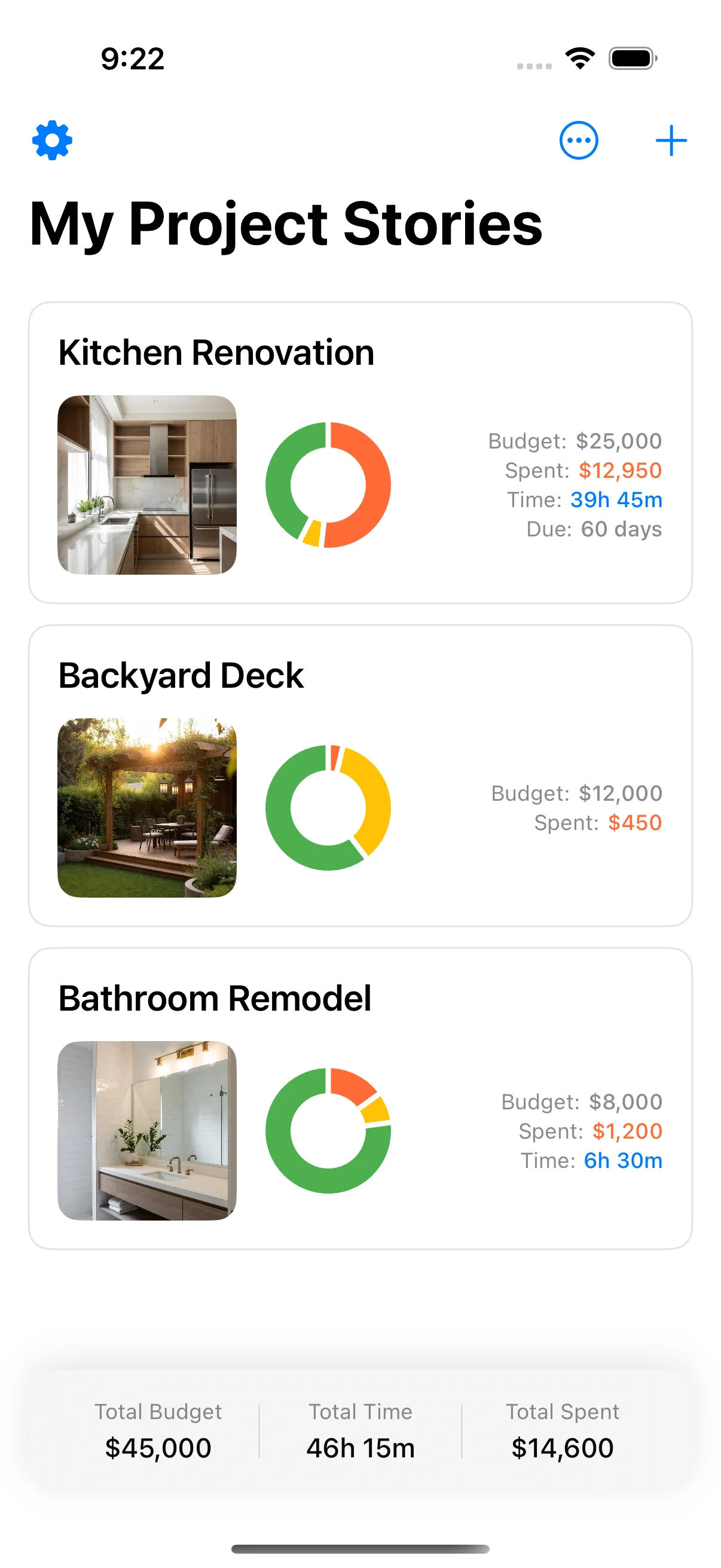
Yes — Home Stories is free on the App Store for iPhone and iPad, with an optional one-time Pro upgrade. It's specifically built for renovations (not a generic project manager), with a running total, photo timelines and task management. PDF export is part of Pro.
Can I import my renovation spreadsheet into an app?
Most renovation-specific apps don't have CSV import yet (the category is too small). The practical workaround: keep your spreadsheet as the planning artefact (line items, contractor quotes), then start fresh in the app on day one of execution. The 9 standard categories transfer in your head.
What about using Notion or Airtable for a renovation?
Both work, with the same on-site logging problem as a spreadsheet — they're fundamentally desk tools. Notion is excellent for the planning phase (mood boards, contractor research) and frustrating once you're on-site. Use it for planning, switch to a phone-first app for execution.
When should I switch from a spreadsheet to a dedicated app?
When you've stopped logging for three days in a row. That's the signal. The information you're losing in those three days is more valuable than the cost of switching tools.
Keep reading

How to Track Home Improvement Expenses: Apps vs Spreadsheets
How to track home improvement expenses — comparing apps vs spreadsheets, with practical advice for keeping your renovation on budget.

Renovation Budget Template: Free Spreadsheet for Every Phase
Renovation budget template — a free spreadsheet breakdown for every renovation phase, with contingency tracking built in.
Renovation Checklist Printable: Your Complete Step-by-Step Guide
Renovation checklist printable — a complete step-by-step renovation checklist you can use to plan and track every phase.