Notion for Home Renovation: When It Works and When It Doesn't
Notion is genuinely excellent for the planning half of a renovation: research, mood boards, contractor notes, a flexible database you can shape however you think. It's just as genuinely frustrating for the execution half — logging a receipt one-handed in a dusty kitchen — because it was never built for a phone on a building site. This is an honest map of where each tool wins.
If you spend any time in renovation forums, you’ll find two camps that talk past each other. One swears Notion is the only tool you need — they’ll share a screenshot of a beautiful renovation hub with linked databases and a mood board that looks like a magazine spread. The other gave up on Notion three weeks into their actual build and can’t quite explain why, only that it “stopped working.”
Both camps are right. They’re just describing different halves of a renovation. Notion is a genuinely excellent tool for one half and a genuinely frustrating one for the other, and the line between them is sharp enough to be worth drawing carefully. This isn’t a hit piece on Notion — I like Notion, and there’s a specific phase where it beats almost everything. It’s a map of where it wins, where it doesn’t, and why “where” turns out to matter more than “features.”
The two halves of a renovation
Every renovation has a planning half and an execution half, and they have almost nothing in common.
Planning happens at a desk, over weeks, in a calm head. You’re researching, comparing quotes, collecting inspiration, mapping out rooms, storing documents. The work is reflective. You have both hands, a screen, and time to make things tidy.
Execution happens on-site, over months, in a chaotic environment. You’re logging a $340 receipt at the builder’s merchant, snapping a photo of the first-fix wiring before it’s plastered over, ticking off a task while a contractor waits for an answer. The work is reactive. You have one hand, a dusty phone, and about ten seconds before the moment’s gone.
A tool that’s perfect for the first half can be actively wrong for the second. That’s the whole story of Notion in a renovation — and it’s the same fault line that makes a spreadsheet stop working halfway through.
Where Notion genuinely wins: planning
Let me be clear about this, because the rest of the post is going to be more critical: for the planning phase, Notion is one of the best tools that exists. If you’re in the months before work starts, this is a real recommendation.
Here’s what it does well:
- A flexible renovation hub. One workspace with room-by-room pages, a budget database, a contractor list, and a document store, all cross-linked. Nothing else gives you this much freedom to model the project the way you think about it.
- Contractor research. A database with one row per trade — quote, availability, references, notes, the gut-feel rating — sortable and filterable. This is genuinely better than a spreadsheet for the comparison stage.
- Mood boards and inspiration. Embed images, drop in links, build a visual board per room. Notion handles this gracefully where a spreadsheet would choke.
- Document storage. Quotes, permits, warranties, plans — all attached where they belong instead of buried in email.
- Quote comparison. Three kitchen quotes side by side with a formula totalling each? Notion does this cleanly.
If your renovation hasn’t started yet, build this hub. You’ll use it before, during, and after the project, and the time spent structuring your thinking up front is never wasted. None of what follows is an argument against doing this.
Where Notion struggles: execution
The trouble starts the day the work does. The same flexibility that makes Notion brilliant for planning becomes friction for the one task you’re now going to do hundreds of times: logging what just happened, from your phone, on-site.
The mobile app is a desk tool in your pocket. Notion’s phone app is capable, but it’s a shrunken version of a desktop workspace, not a tool designed for speed. Adding a budget entry on-site means opening the app, finding the right database, opening a new row, filling several properties, attaching a photo, saving. It’s perhaps 30–45 seconds of focused tapping. That sounds trivial until you’re doing it one-handed, in a dusty room, with a contractor mid-sentence — and so you don’t do it. You tell yourself you’ll catch up Sunday.
Catching up Sunday doesn’t work. By Sunday you can’t remember which receipt was the $112 one and which was the $340 one. You enter a “miscellaneous” line and tell yourself it’s fine. The budget database — which only protects you if it’s current — quietly drifts a week behind, then two, then it’s a relic you don’t open. This is precisely the failure pattern spreadsheets have, for precisely the same reason: the friction of logging exceeds the focus you have on-site.
Budget maths is manual. You can build rollups and formulas, but you have to build and maintain them. There’s no renovation-specific structure out of the box — no built-in contingency handling, no sense of the phases of a renovation, no understanding that a “budget” has a planned figure, an actual figure, and a remaining buffer that should be watched as a live balance. You’re constructing all of that yourself, and then maintaining it by hand, on a phone, during the busiest months of the project.
No purpose-built photo timeline. You can attach photos in Notion. But a renovation generates a chronological visual record — before, during, behind-the-wall, after — and Notion has no native concept of that timeline. You end up with photos scattered across pages instead of a single dated progression you can scroll.
None of these is a flaw in Notion as a product. They’re the cost of generality. A tool that can be anything isn’t optimised for the one repetitive thing a live renovation demands.
Where a phone-first tracker wins: the on-site logging job
For the broader field (design, measuring, contractor portals), best home improvement apps maps which tool fits which phase.
What that buys you in the execution phase:
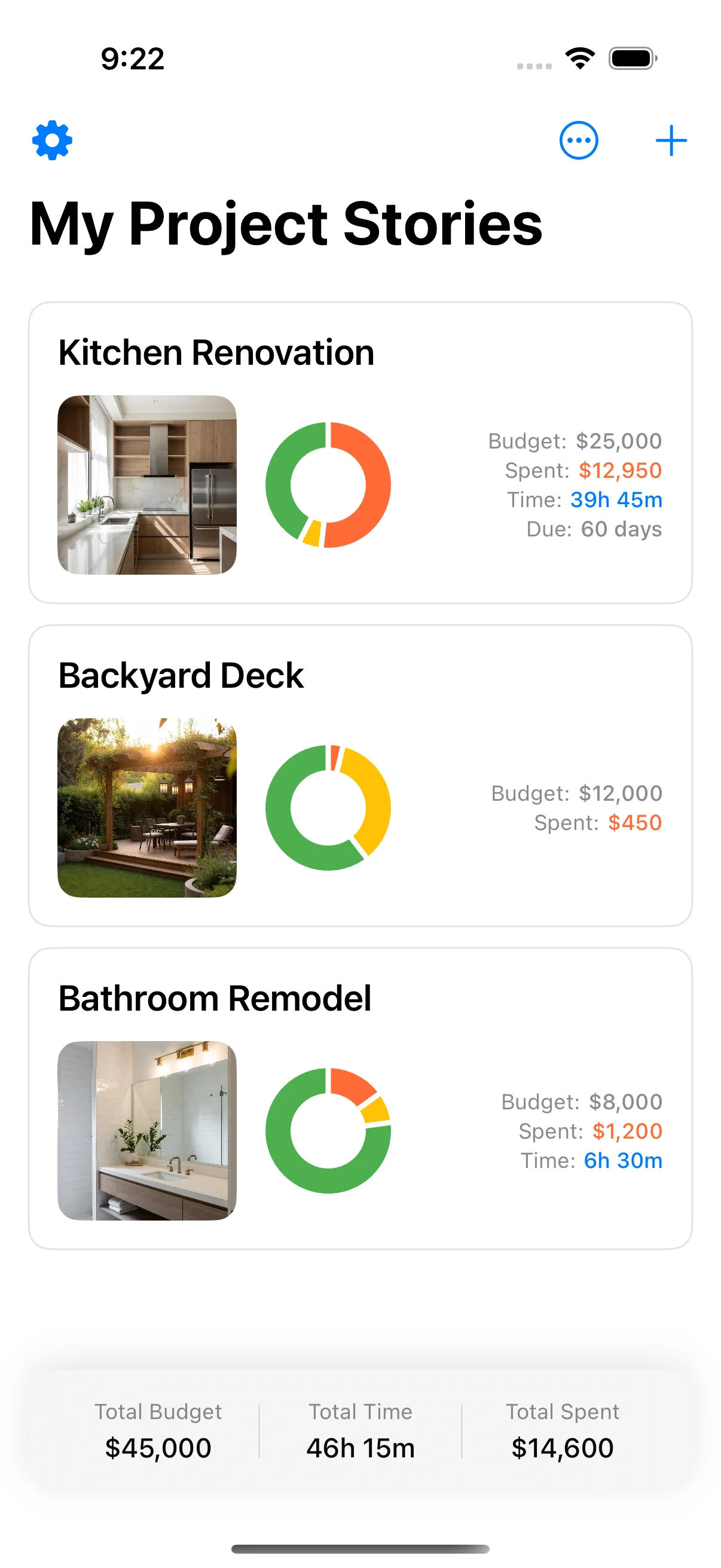
- One-handed logging. A cost is a couple of taps and a photo of the receipt — fast enough that you actually do it at the merchant’s counter, not “later.” Because you log in the moment, the data stays accurate.
- A budget that’s already structured for renovations. A running total, with materials, labour and contractor kept apart, and a contingency buffer you can watch in the numbers — no formulas to build or maintain. The budget-vs-actual chart is part of Pro.
- A photo timeline by default. Photos land in a dated, chronological record — the visual history of the project — without you organising anything.
- Task tracking that lives where the work is. Tick things off from the site, not from a desk you’re rarely at during a build.
- PDF export (Pro). A summary for your records, your accountant, or your own sanity at handover.
The point isn’t that the tracker has more features than Notion — it deliberately has fewer. It’s that the features it has are pointed at the exact task Notion makes hardest, and removing the friction from that task is what keeps the data honest for the whole build.
Side by side
| Notion | Phone-first tracker | |
|---|---|---|
| Planning hub & free-form pages | Excellent | Not its job |
| Contractor research database | Excellent | Limited |
| Mood boards / inspiration | Excellent | Not its job |
| Document storage | Strong | Limited |
| On-site cost logging | Slow, high-friction | Fast, phone-first |
| Renovation-specific budget structure | Build it yourself | Built in |
| Contingency / live running balance | Manual | Built in |
| Photo timeline | Scattered | Chronological by default |
| Best phase | Before work starts | Once work is underway |
Read down that table and the pattern is obvious: the two tools win in almost perfectly opposite columns. That’s not a coincidence — it’s the planning/execution split showing up feature by feature.
The honest recommendation: most people want both
This isn’t a “switch to the app and delete Notion” post. The genuinely useful setup for most renovators is to let each tool do the half it’s good at:
- Plan in Notion. Build the hub before work starts — contractor database, quote comparisons, mood boards, document store, room pages. Lean into its flexibility. This is where it’s worth the time.
- Execute in a phone-first app. The day demolition starts, the job changes from thinking to capturing. That’s when a desk tool quietly fails and a phone-first tracker earns its place. Log costs, photos, and tasks as they happen, and keep the budget as a live balance.
The two don’t really compete; they hand off. Notion holds the static planning artefacts you’ll refer back to. The app holds the live, fast-moving record of what’s actually happening on-site. The handoff point is roughly the day the first wall comes down.
And if you only want one new tool — if you’ve already got planning handled in Notion, a spreadsheet, or your head — then add the one for the part that actually breaks. The part that breaks is never the planning. It’s keeping the budget honest while the work is underway, logging one-handed in a room full of dust. That’s the part Notion handles worst, and the part a dedicated renovation budget tool was built for — see how to budget a home renovation.
Home Stories is free on the App Store — keep your Notion hub for planning, and let a phone-first tracker carry the budget through the months when a desk tool can’t.
If your shortlist is platforms rather than Notion, read HomeZada vs Houzz Pro next.
Sources and further reading
The ranges and guidance above are drawn from direct project experience and from the bodies below, which publish the underlying standards, rules and market data. They are worth reading directly before you commit money.
- For the Home — consumer guidance — US Federal Trade Commission
- Home improvements and repairs — US Dept. of Housing and Urban Development
Frequently asked questions
Is Notion good for planning a home renovation?
Yes — for planning, it's one of the best tools available. Notion's flexible pages and databases let you build a renovation hub exactly how you think: room-by-room pages, a contractor database, mood boards, quote comparisons, and document storage all in one place. Where it struggles is execution — logging costs, photos, and progress from your phone while you're on-site — because it's fundamentally a desk tool that assumes you have two hands and 30 seconds of focus per entry.
Can I use Notion to track a renovation budget?
You can build a budget database in Notion and it'll work well at the desk — formulas, rollups, category totals. The problem is the same one spreadsheets have: it goes stale the moment logging requires effort you don't have on-site. A budget tracker only protects you if it's current, and a desk-first tool quietly drifts out of date once execution starts. For the live running balance, a phone-first app keeps it accurate without nightly catch-up admin.
What's the difference between Notion and a dedicated renovation app?
Notion is a general-purpose workspace you shape into anything — which makes it powerful for planning and high-friction for a specific repetitive task like on-site logging. A dedicated renovation app like Home Stories does one job: it makes capturing a cost, photo, or task on your phone take seconds, with a budget structure already built in. You trade Notion's infinite flexibility for speed at the one task you'll do hundreds of times during a build.
Should I use Notion or an app for my renovation?
Use Notion for the planning phase — research, mood boards, contractor shortlists, document storage — where its flexibility is a genuine advantage. Switch to (or add) a phone-first app like Home Stories for the execution phase, where the job is fast, repeated, on-site logging. Most people who try to run the whole project in Notion abandon the budget tracking around week three for exactly the same reason spreadsheets fail: the tool needs a desk, and the renovation is happening in a half-demolished room.
Is Home Stories free?
Yes — Home Stories is free on the App Store for iPhone and iPad, with an optional one-time Home Stories Pro upgrade. It's built specifically for renovations rather than being a general productivity tool, with a running total, a photo timeline and task management. PDF export is part of Pro. It requires iOS 17 or later.
Keep reading

Best Home Improvement Apps 2026: 6 Actually Worth Installing
Best home improvement apps 2026 — six iPhone apps that are actively maintained and actually useful for real projects.

How to Track Home Improvement Expenses: Apps vs Spreadsheets
How to track home improvement expenses — comparing apps vs spreadsheets, with practical advice for keeping your renovation on budget.

Renovation Spreadsheet Alternative: Why Apps Beat Spreadsheets
Renovation spreadsheet alternative — why apps beat spreadsheets for tracking renovation costs, receipts, and decisions on-site.