Best Home Improvement Apps 2026: 6 Actually Worth Installing
There is no single best home improvement app, because a renovation isn't a single job. Finding a contractor, measuring a room, designing a layout, and keeping the budget honest while the dust flies are four different problems, and the apps that are brilliant at one are usually hopeless at the others. Here are six iPhone apps worth your home screen in 2026 — checked against the App Store, not copied from other lists.
Search for the best home improvement apps and you’ll get a dozen lists that are all, quietly, the same list. The same six or seven names in a slightly different order, each with a paragraph of marketing copy lightly reworded. Almost none of them have been checked recently.
Here’s how you can tell: HomeZada appears on nearly every one of those lists. Its iPhone app has not shipped an update since May 2022, and it averages 2.9 stars. Four years of iOS releases have come and gone. Nobody writing those round-ups opened the App Store.
So this list is built differently. Every app below was checked against the App Store in July 2026 — rating, review count, and last update date. And it’s organised by job, because that’s the thing the round-ups get most wrong. A renovation isn’t one task. It’s four, they happen in sequence, and no app is good at all of them.
The four jobs, and why one app can’t do them all
Lay a renovation out end to end and it looks like this:
- Inspiration and hiring — figuring out what you want, and finding someone to build it.
- Measurement — knowing the actual dimensions of what you’ve got.
- Design — trying the idea out before committing money to it.
- Execution — the six months where money leaves your account and decisions get made in dusty rooms.
Jobs 1 to 3 happen at a desk, over a few weeks, and they’re fun. Job 4 happens on-site, over months, and it’s where renovations actually go wrong. This is the pattern behind the whole list: the apps are excellent at the fun part and mostly absent from the hard part. Almost the entire home improvement app market is built for the weeks before the first wall comes down.
Keep that in mind as you read, because it tells you which one you actually need.
1. Houzz — for ideas and finding a professional
Free · 4.8★ (322,000+ ratings) · iOS 17+
Houzz is the giant, and it earns it. Twenty-five million-plus photos of real interiors, organised well enough that you can actually find the thing in your head, and a directory of home improvement professionals deep enough that in most regions you’ll find someone local. The “View in My Room 3D” feature drops products into your space in AR, and “Visual Match” lets you point at a photo and find the product in it.
What it’s genuinely best at: the very beginning. You have a vague feeling about your kitchen and no vocabulary for it. Houzz gives you the vocabulary, then gives you three people who can build it.
Where it stops being useful: the day you hire someone. Houzz is an inspiration and marketplace product — it wants to show you ideas and sell you things. It is not a project tracker, and it makes no serious attempt to be one. Save your Ideabooks, hire your contractor, and expect to reach for something else.
Install it if: you’re at the “what do I even want” stage, or you still need to find a pro.
2. Polycam — for measuring, using the scanner already in your phone
Free tier · 4.7★ (42,000+ ratings) · iOS 17+
If your iPhone is a Pro model, it has a LiDAR scanner in it, and Polycam is the most approachable way to actually use it. Walk around a room, and you get a 3D scan and a usable floor plan with dimensions — in a couple of minutes, with no tripod, no laser measure, and no crawling behind the sofa with a tape.
What it’s genuinely best at: capturing what exists, fast. Which matters more than people expect, because almost every renovation argument eventually reduces to a dimension nobody wrote down. Scanning a room before demolition also gives you a permanent record of what was there — worth a great deal when you’re trying to reconstruct where a pipe ran.
Where it stops being useful: it captures reality, it doesn’t help you change it. There’s no budgeting, no scheduling, no design.
Install it if: you have a LiDAR-capable iPhone and any room you’ll need measurements for. It takes ten minutes to learn and it’s free to try.
3. magicplan — for a floor plan a builder will take seriously
Free to try, subscription for real use · 4.7★ (40,000+ ratings) · iOS 15.1+
magicplan is what Polycam becomes when the output has to survive contact with a professional. It’s built for remodelers, restoration contractors and insurance adjusters: measured floor plans, structured room-by-room data, and estimates generated off the plan. It is actively maintained — the last update landed days before this was published.
What it’s genuinely best at: producing a document other people will accept. If you need a plan to hand to a builder, an architect, or an insurer, this is a step up from a homeowner scan.
Where it stops being useful: the pricing is aimed at people who bill clients. For a single home renovation, a magicplan subscription is a lot of money for a document you’ll produce once. It’s overkill unless you’re doing something structurally serious — or you’re the one being paid.
Install it if: you’re doing a significant structural project, dealing with an insurance claim, or you’re a professional.
4. Planner 5D — for trying a layout before you commit
Free tier · 4.4★ (38,000+ ratings) · iOS 17+
Planner 5D is the most forgiving of the design tools. Draw the room, drop in furniture and finishes, and look at it in 2D or 3D without learning CAD. The AI-assisted design features have got noticeably better, and the learning curve is gentle enough that you’ll actually finish something — which is not true of the more powerful alternatives.
What it’s genuinely best at: answering “will this actually work?” before it’s expensive to answer. Moving a doorway is free in Planner 5D and costs four figures in real life. That asymmetry is the entire argument for design software.
Where it stops being useful: it’s a visualisation tool, not a construction document, and certainly not a project manager. Treat the output as a conversation piece for your builder, not a spec.
Install it if: you’re moving walls, reconfiguring a kitchen, or arguing with your partner about a layout. It settles arguments cheaply.
5. Buildertrend — but only if your contractor already uses it
Free app, contractor pays · 4.5★ (4,900+ ratings) · iOS 18+
Buildertrend is professional construction management — schedules, change orders, invoicing, client communication. You don’t buy it; your contractor does. What matters to you is that it has a client portal, and a lot of homeowners never think to ask for access to it.
What it’s genuinely best at: visibility into your contractor’s world. Their schedule, their documents, their change orders, in writing, timestamped.
Where it stops being useful: and this is the important bit — your contractor’s system is not your record. It’s built around their invoices and their liability. It won’t contain the tiles you bought yourself, the light fittings from the second-hand shop, the extra weekend at the builders’ merchant, or the money you spent while they weren’t on site. On a typical renovation those direct purchases are a large share of the total, and they are invisible to your builder’s software. Relying on it for your budget is how people end up genuinely shocked at the end.
Install it if: your contractor uses it. Ask for portal access on day one — most homeowners don’t, and it’s free to you.
The one everybody recommends, that we can’t
HomeZada turns up on almost every list of this kind, usually described as a comprehensive home management platform — documents, maintenance, improvement budgets, whole-home inventory. The concept is genuinely good, and the web product is still actively sold.
But as of July 2026, the HomeZada Mobile app on the App Store hasn’t been updated since May 2022 and averages 2.9 stars from around 44 ratings. Every other app on this list is in the 4.4–4.8 range with tens of thousands of ratings and shipped an update within the last month.
We’re pointing this out for two reasons. It’s a real answer to a real question — people ask whether HomeZada is worth it. And it’s a decent test to apply to any list you read, including this one: open the App Store and look at the last update date. It takes ten seconds and it invalidates a surprising amount of what’s written about software.
If HomeZada is genuinely on your shortlist, HomeZada vs Houzz Pro works through both in more depth, including who each one is actually built for.
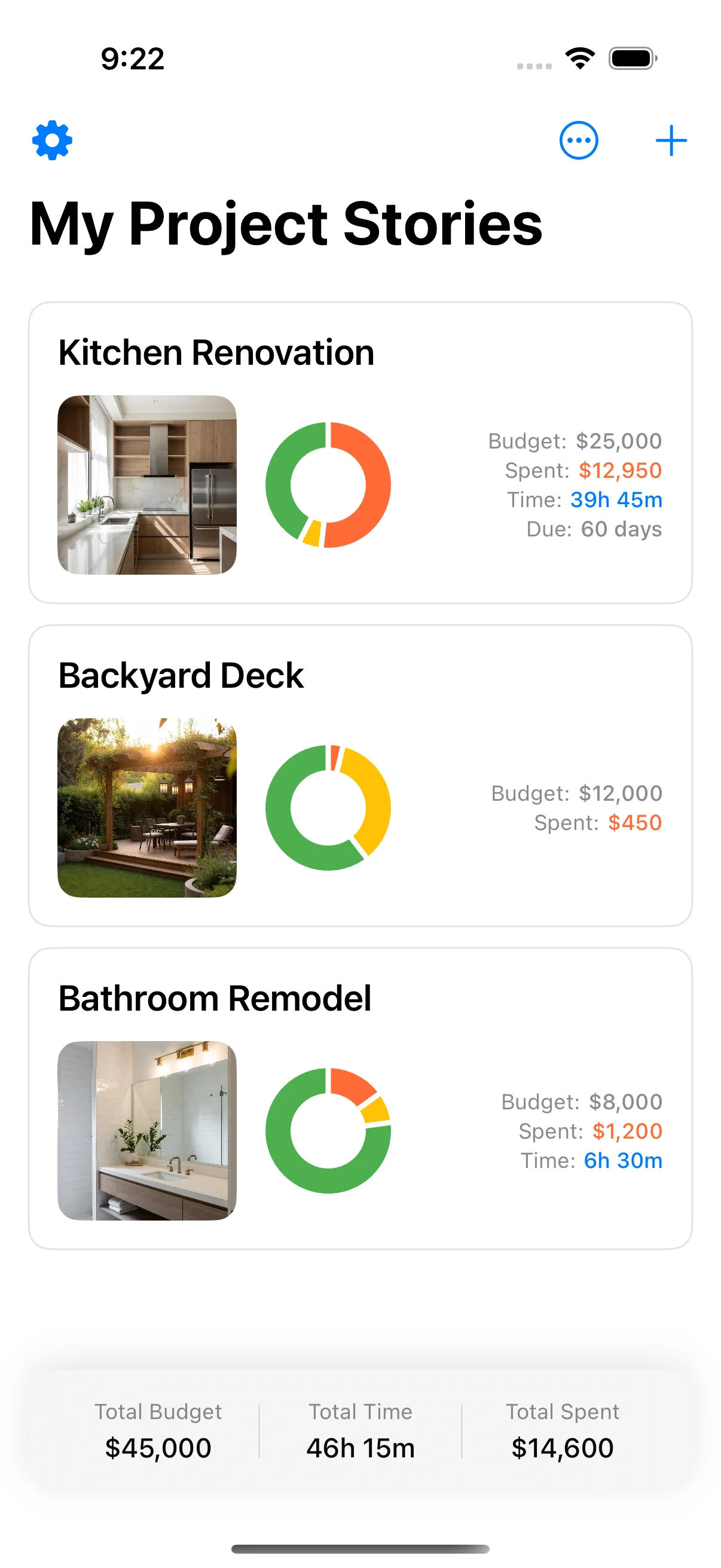
6. Home Stories — for the part that actually goes wrong
Free, optional one-off Pro · iPhone and iPad · iOS 17+ · Disclosure: this is our app
Let’s be straight about the bias: we make this one. You should weigh what follows accordingly. But it’s on the list for a specific and defensible reason — go back through the other five and notice what none of them do.
Houzz stops at hiring. Polycam and magicplan capture the building, not the project. Planner 5D stops when the design is settled. Buildertrend belongs to your contractor. Not one of them is designed for the six months in the middle, when you’re standing in a dusty room with one hand free, having just spent £240 on flooring, needing to record that fact before it evaporates.
That gap is not an accident, and it’s not a small one. It’s where renovations actually fail. Not in the design — in the slow accumulation of unrecorded costs, forgotten decisions, and receipts that faded in a drawer. The average renovation goes over budget, and it rarely happens in one dramatic moment. It happens fifty pounds at a time, invisibly, because nothing was writing it down.
It does one job: it keeps an honest record while the work is happening. Log a cost in seconds at the till. Photograph the wall before it’s closed up. Keep receipts captured at the point of sale instead of in a shoebox. See a live running balance against your budget rather than discovering the damage at the end. It’s phone-first because that’s where you are — not at a desk with a spreadsheet, which is precisely why spreadsheets stop working halfway through.
It deliberately does less than most apps here. It won’t design your kitchen or find you a builder — the apps above already do that well, and you should use them.
Install it if: work is about to start, or has started, and nothing is currently keeping track of what it’s costing you.
What to actually install
Building your own tracker in a notes tool? Read Notion for home renovation before you invest a weekend in a template.
Six apps is a list, not a recommendation. Here’s the honest version:
| If you’re… | Install |
|---|---|
| Still dreaming, no contractor yet | Houzz |
| Needing dimensions of what you’ve got | Polycam (or magicplan if a pro needs the plan) |
| Deciding whether a layout works | Planner 5D |
| Working with a contractor who uses it | Buildertrend — ask for portal access |
| About to start work, or already building | A phone-first tracker |
| Wanting a whole-home document vault | HomeZada on the web — not the iPhone app |
Most people need two: one from the top half of that table, and one from the bottom. The top half is the enjoyable part, and it’s where the entire app market has concentrated its effort. The bottom half is the part that decides whether your renovation finishes on budget.
Install for the phase you’re actually in. And when work starts, make sure something is keeping score — because the renovation will keep spending your money whether or not anyone is writing it down.
App Store ratings, review counts and update dates were checked on the US App Store in July 2026 and will drift over time. The one number worth re-checking yourself is the last-updated date.
Sources and further reading
Consumer guidance worth reading alongside the App Store listings above.
- For the Home — consumer guidance — US Federal Trade Commission
- Home improvements and repairs — US Dept. of Housing and Urban Development
Frequently asked questions
What is the best app for home renovation in 2026?
There isn't one, and any list that gives you a single answer is selling something. Renovation splits into four jobs that need different tools: gathering ideas and hiring a professional (Houzz), measuring rooms and producing floor plans (Polycam or magicplan), designing and visualising a layout (Planner 5D), and running the project day-to-day once work starts — tracking costs, photos, receipts and tasks (a phone-first tracker like Home Stories). Most homeowners genuinely need two of these, not six. Work out which phase you're actually in and install for that.
Is HomeZada still a good app?
The web product is still actively sold, but the iPhone app is hard to recommend in 2026. As of July 2026 the HomeZada Mobile app on the US App Store has not shipped an update since May 2022 and averages roughly 2.9 stars across only around 44 ratings — well below every other app on this list. It appears on nearly every 'best renovation apps' round-up, which is a good illustration of how rarely those lists are actually checked. If the whole-home document vault is what you want, use it on the web and set your expectations for mobile accordingly.
Are there free home improvement apps for iPhone?
Yes — every app on this list is free to download, though most sell a subscription or a paid tier for advanced features. Houzz and Planner 5D are free to browse and design with, Polycam has a capable free tier for scanning, magicplan is free to try but priced for professionals, and Home Stories is free with an optional one-off Home Stories Pro unlock. Be a little careful with 'free': the pro-facing tools (magicplan, Buildertrend) are built around subscriptions that make sense for a contractor billing clients and much less sense for a one-off homeowner project.
Do I need an app to renovate my house?
You don't need one to design or to gather ideas — a Pinterest board and a tape measure have carried plenty of successful projects. Where you feel the absence of a tool is during execution: a renovation generates a constant trickle of costs, receipts, decisions and photos over several months, and human memory and a shoebox both fail at that. That's the failure mode worth solving. If you only install one thing, install the one that keeps a running record while the work is underway.
What app do contractors use for renovations?
Most commonly Buildertrend, Houzz Pro, or magicplan — all of which are built for the professional side of the job (estimating, scheduling, invoicing, change orders). If your contractor uses one, ask whether it includes a client portal, because that's your window into their schedule and documents. Just don't mistake it for your own record: their system is built around their invoices and their liability, and it usually won't capture the things you buy directly, which on most renovations is a substantial share of the total spend.
What's the difference between a home design app and a renovation tracking app?
A design app (Planner 5D, Houzz, Morpholio) helps you decide what to build — layouts, finishes, mood boards, 3D views. A tracking app helps you survive building it — what it's costing versus budget, what was decided, what was paid, and what the wall looked like before it was closed up. Design apps are used intensively for a few weeks and then abandoned; a tracking app earns its keep over the whole project. They're complementary, and the mistake is assuming the first kind will cover the second.
Keep reading
Home Renovation Phases: The 6 Stages You Can't Skip
The 6 home renovation phases you can't skip, from planning to snag-free handover, with what actually matters to track at each stage.

Renovation Budget Template: Free Spreadsheet for Every Phase
Renovation budget template — a free spreadsheet breakdown for every renovation phase, with contingency tracking built in.
Renovation Checklist Printable: Your Complete Step-by-Step Guide
Renovation checklist printable — a complete step-by-step renovation checklist you can use to plan and track every phase.