How to Track Home Improvement Expenses: Apps vs Spreadsheets
Tracking home improvement expenses only matters if you're doing it on-site, where the money actually leaks. This post compares four methods on the single metric that matters: will you still be logging after three weeks of dust, decision fatigue, and contractor delays?
I tracked my last renovation expenses in a spreadsheet for six weeks. Then I stopped.
Not because I forgot — because logging a $47 grout purchase into a row on a phone screen, while standing in a room with dust on my phone and a contractor waiting for an answer, felt like the wrong tool for the job. So I didn’t do it. Three days later, the spreadsheet was ghost data: numbers I was making up from memory instead of recording from receipts.
This is the failure mode almost every renovator hits. The method you choose for tracking expenses is the method you’ll abandon, usually by week four, when the novelty of staying on top of the budget wears off and the reality of logging data in a half-demolished kitchen sets in.
The question isn’t which method has the most features. It’s which method will you still be using when the job is noisy, your hands are full, and you have ten seconds before the moment’s gone.
Here’s an honest comparison of the four methods I’ve actually used (or seen fail) for tracking home improvement expenses.

Method 1: Spreadsheet
The most common starting point by a wide margin. If you’ve read the renovation budget template guide, you’ve already got a spreadsheet set up with nine categories and fifty line items. Now you just need to fill in the “actual paid” column.
What works:
- You’re already set up from planning. The categories and line items in your spreadsheet are the same ones you built during the budgeting phase, so there’s no migration step.
- Powerful formulas. A well-built spreadsheet tracks planned vs. actual per line item, category totals, running contingency, and colour-codes overruns. That’s hard to beat for analysis.
- Export-friendly. PDF, CSV, Google Sheets — whatever your accountant or bank needs, a spreadsheet handles it.
What doesn’t:
- It’s a desk tool. The friction of logging a cost on a phone screen — finding the right row, typing the amount, attaching a photo of the receipt (which most spreadsheets can’t do natively) — is the difference between logging it at the merchant and logging it “Sunday.” Sunday rarely comes.
- It drifts stale. The moment you miss two days of entries, the spreadsheet stops being a record and starts being a fiction. You fill in approximate numbers, and the budget no longer reflects reality.
- No receipt capture. You can paste a receipt image into a cell, but that’s a manual attachment step, not a tap. Most people skip it, and then they’re chasing paper receipts weeks later.
Verdict: Spreadsheets are great for planning and fine for weekly review. They’re fragile for real-time, on-site logging — which is when you need them most. If you use one, commit to updating it the same day any expense happens. The three-day catch-up window is where budgets go to die.
Method 2: Notion
Notion has become the default renovation planning tool for a generation that grew up with flexible databases and pretty dashboards. It’s genuinely powerful for the pre-build phase — contractor research, mood boards, quote comparisons, document storage. But the question here is about expense tracking, which is a different half of the project.
What works:
- A budget database in Notion can be flexible and beautiful. You can build custom properties, rollups, and views that make the numbers feel satisfying. The Notion for home renovation comparison walks through this in detail.
- It’s connected to your planning artefacts. Your budget lives in the same workspace as your contractor database, your permits folder, your room pages. That’s nice, but it’s a planning benefit, not an execution one.
What doesn’t:
- Mobile logging is slow. Adding a budget entry on-site means opening the database, creating a new row, filling properties, and attaching a photo. That’s 30–45 seconds of focused tapping with a phone in a dusty room. It sounds small, but 30 seconds you don’t have at the point of purchase is the exact gap between a current record and a ghost one.
- Catch-up Sunday doesn’t work for Notion either. By the time you sit down with a laptop, you can’t remember which receipt was the $62 one and which was the $189 one. You enter a “miscellaneous” line and move on.
- No built-in renovation structure. A Notion budget is whatever you build it to be. There’s no pre-configured contingency handling, no sense of renovation phases, no built-in planned-vs-actual flow. You’re maintaining your own formulas and rollups on a phone, during the busiest months of the project.
Verdict: Notion is a brilliant renovation hub for the planning phase. For expense tracking during execution, it suffers from the same problems as a spreadsheet — the friction of logging exceeds the focus you have on-site. More on Notion vs dedicated tools here.
Method 3: Dedicated renovation app
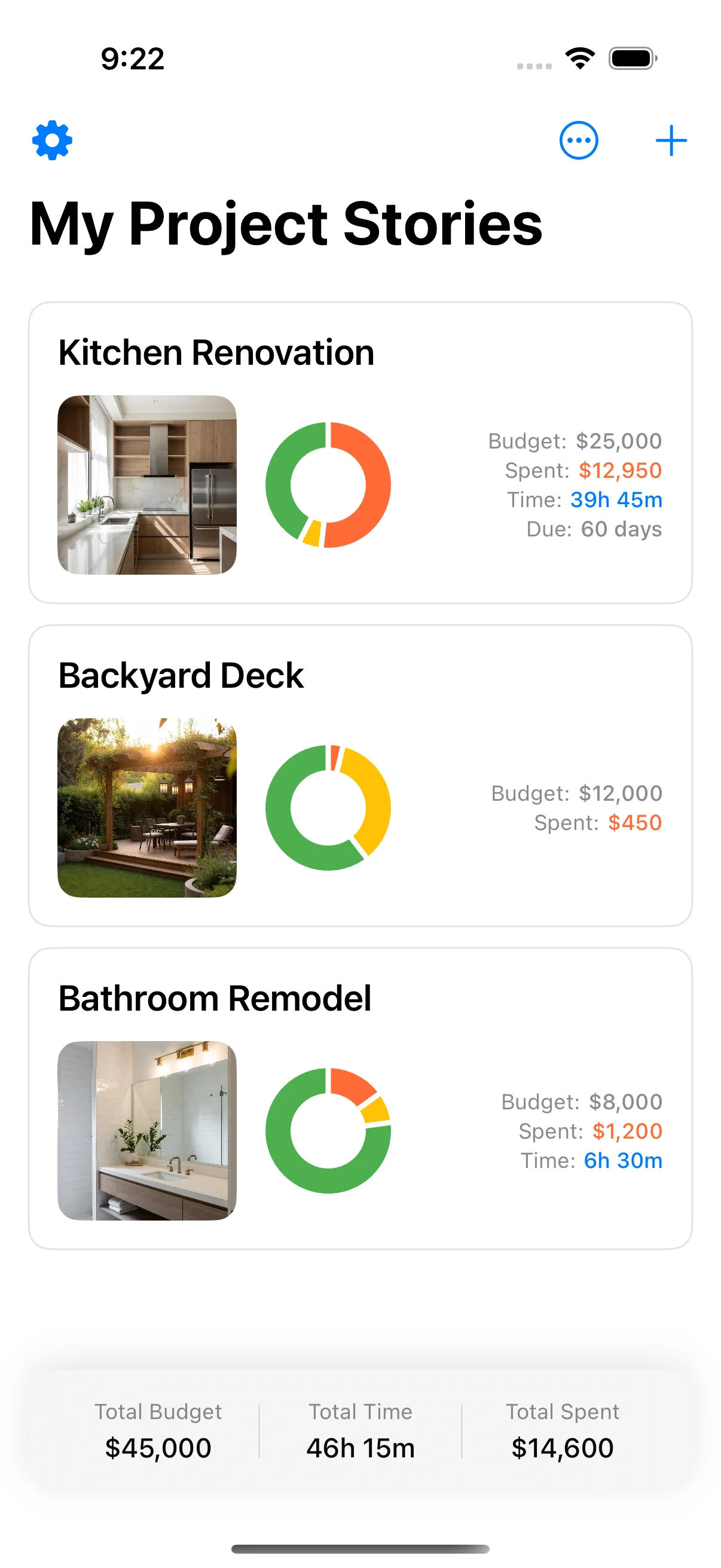
This is where things get interesting. A dedicated renovation app — a phone-first tracker, HomeZada, or a contractor platform with a client portal — is purpose-built for the execution phase. It does one thing: make capturing a cost, a photo, and a category take seconds on your phone.
What works:
- One-handed logging. Enter a cost, snap a receipt photo, pick a category — in about 10 seconds. Fast enough that you actually do it at the point of purchase, not “later.” That’s the single biggest differentiator. Because you log in the moment, the data stays current.
- Receipt photos are automatic. Tap your camera, the receipt is attached to the expense line, time-stamped and supplier-named. Two years later, when you need it for a warranty claim or a tax deduction, it’s there instead of being a missing receipt you can’t remember the value of.
- Budget structure is pre-built. A dedicated app understands what a renovation budget looks like: planned vs. actual per category, contingency handling, and a running balance that updates as you log. You don’t need to build this. It’s there from the start.
- The photo timeline. Every expense comes with a photo, arranged chronologically. It’s not just a budget record — it’s a visual history of the project, which is invaluable for contractor disputes, warranty claims, and “what did we put behind that wall?”
What doesn’t:
- Less flexibility. You can’t customise every field or build custom views. The app gives you a structure and you use it. If you’re used to tweaking your spreadsheet columns daily, this feels limiting — until you realise the structure is there so you don’t have to maintain it on a phone at 5pm on a Friday.
- Vendor lock-in. Your data lives in the app. Exporting a PDF or CSV is usually possible, but you’re tied to the app for the duration of the build. If the app shuts down, your data goes with it. Most dedicated apps are built by companies that own the data problem — they have a strong incentive to keep you as a customer, and they export cleanly.
- iOS-first. If you’re on Android, the options are more limited. Most renovation apps target iOS first.
Method 4: The receipts-in-a-jar method (no digital tracking)
This is the method most people accidentally start with: a folder, a shoebox, or a dedicated drawer for invoices and receipts. You keep the paper, you sort through it at the end, and you enter the totals into a spreadsheet or just kind of remember the big purchases.
What works:
- Zero friction at point of purchase. You keep the receipt. Done. No app to open, no typing, no decisions.
- It works for small projects. If you’re replacing a tap and a light fitting and the total is under $500, a receipts-in-a-jar method is fine. The cognitive load of tracking is minimal, and the payoff of having records is real enough.
What doesn’t:
- You’ll never enter the data. This isn’t pessimism — it’s physics. A renovation generates 50–200 individual receipts over 8–20 weeks. None of them look like much when you pick them up. By week two, the pile is unmanageable. By week six, you’ve stopped saving them because the shoebox is full and you don’t want to think about it.
- Numbers are guesswork. Without running totals, you don’t know whether you’re under or over budget at any point. You find out you’ve gone over when you’re trying to approve a $4,000 change order and the bank won’t cover it.
- Tax and warranty claims become archaeology. When you need a specific receipt for a warranty claim or a tax audit two years later, it’s buried in a box you haven’t opened since the renovation ended.
Verdict: The receipts-in-a-jar method is a record-keeping strategy, not an expense tracking strategy. It keeps physical receipts but abandons digital records, which means you lose the two things that make tracking useful: real-time visibility and searchable history. Use it as a supplement to a digital method, not a replacement.
Side by side
| Spreadsheet | Notion | Dedicated app | Receipts in a jar | |
|---|---|---|---|---|
| Setup time | 1–2 hours | 2–4 hours | 5 minutes | 0 minutes |
| On-site logging speed | Slow (30–60s) | Slow (30–45s) | Fast (10s) | Instant |
| Receipt capture | No | Manual | Automatic | Physical |
| Real-time budget visibility | Yes (if updated) | Yes (if updated) | Yes | No |
| Runs stale when abandoned | Yes | Yes | Doesn’t apply | Yes |
| Best for | Planning + weekly review | Planning + light tracking | Execution phase | Small projects |
The method comparison nobody talks about
There’s one dimension that doesn’t show up in any feature comparison but matters more than any of them: the decay curve.
Every expense tracking method has a decay curve — the rate at which it stops being accurate as the renovation proceeds. Here’s how the four methods decay:
- Spreadsheet: Accurate for ~7 days after the last update. After that, entries are estimates or omissions. The budget becomes a best-guess document rather than a record.
- Notion: Same decay profile as spreadsheet. The barrier to entry is slightly higher (the app is less intuitive on mobile), so decay might start a few days earlier.
- Dedicated app: Near-zero decay, assuming you log as you go. The low friction means entries happen at the point of purchase. The data stays current.
- Receipts in a jar: Never accurate, because the data isn’t digitised. The pile of paper grows, the mental model of what you’ve spent becomes fuzzy, and the actual total is unknowable until you sort through everything.
The method with the shallowest decay curve is the one that saves your budget. Not the one with the most features, the prettiest interface, or the most export formats. The one that you actually use.
Putting it together
Two names that come up constantly are compared in depth in HomeZada vs Houzz Pro.
If you want the wider landscape first — design apps, measuring tools, contractor portals — see the renovation apps worth installing.
Tracking home improvement expenses isn’t a technical problem — it’s a discipline problem. The method is secondary to the habit: log on the day the expense happens, and log against the right category so the numbers mean something.
If you’re planning this post, set up a budget template first so your tracking categories match your planned ones. If you’re in the execution phase, keep your contingency ring-fenced and watch it drain in real time. The nine-category structure and the contingency guidance from the budgeting guide cover the setup; the app handles the running balance while the dust flies.
Because here’s the thing: the method you pick at week one determines whether your budget is a living document at week twelve or a fiction you don’t open because the numbers stopped meaning anything. Pick the method that survives the dust.
Frequently asked questions
Already covered in the FAQ section above — four practical questions on the best way to track expenses, tax considerations, detail level, and post-project record keeping.
Related posts
- Renovation Budget Template (Free PDF + Google Sheet)
- How to Budget a Home Renovation Without Going Over
- Renovation Contingency Budget: How Much to Set Aside
- Notion for home renovation planning
Ready to track expenses without the spreadsheet headache?
Home Stories is free on the App Store. Set your budget once, log costs and receipt photos as they happen, and always know — to the line item — how much of your budget is left. No Sunday catch-up, no stale spreadsheets. Just current numbers, wherever the work takes you.
Sources and further reading
The ranges and guidance above are drawn from direct project experience and from the bodies below, which publish the underlying standards, rules and market data. They are worth reading directly before you commit money.
- Housing economics and remodeling market data — National Association of Home Builders
- Home improvements and repairs — US Dept. of Housing and Urban Development
- For the Home — consumer guidance — US Federal Trade Commission
Frequently asked questions
What is the best way to track renovation expenses?
The best way is whatever method you'll actually use while standing in a half-demolished room logging a receipt one-handed. That disqualifies desk-first tools — spreadsheets, Notion, most project management software — because they assume two hands and 30 seconds of focus. A dedicated renovation app like Home Stories is purpose-built for this: it makes logging a cost, attaching a receipt photo, and updating the budget take about 10 seconds on your phone. If you must use a spreadsheet, set it up before the work starts with the same categories you'll log against (the <a href='/blog/renovation-budget-template/'>budget template guide</a> covers this), and commit to updating it every time a purchase is made.
Should I track home improvement expenses for tax purposes?
Yes, in most jurisdictions you can deduct renovation expenses that improve your property's value, and some can be depreciated if the property is rented out. The key is having a clear paper trail: receipt photos, dates, supplier names, and categories. A spreadsheet can work for this if you maintain it consistently, but a dedicated app is more reliable because it captures the receipt photo at the point of purchase rather than relying on you remembering to file it weeks later. For rental properties, VAT and improvement deductions are especially important to track accurately.
How detailed should I be when tracking renovation expenses?
Line-item level, not category level. 'Kitchen: $8,000' tells you nothing when you want to know whether you overspent on cabinets or the countertop. The structure from the <a href='/blog/renovation-budget-template/'>budget template post</a> — nine cost categories with typical line items pre-populated — is a good starting point. Log each purchase against the specific line item it belongs to, and include the supplier name and date. That level of detail is what makes the numbers actionable during the build and useful for tax records afterward.
Do I need to track expenses in real time during a renovation?
Yes, because a renovation budget is only as good as its most recent data point. If you log expenses once a week, you're operating on data that's at least three to five days old by the time you review it — long enough for small overruns to compound into surprises. Real-time tracking means logging as each expense happens: at the builder's merchant, when the invoice arrives, when the contractor submits a change order. A phone-first app makes this fast enough to do without breaking your workflow. A spreadsheet can work if you have the discipline, but it rarely survives past week three of a real build.
What about tracking expenses after a renovation is done?
Post-project tracking is for records, warranty claims, and tax filings. At this stage, a spreadsheet or PDF export is fine because the urgency is gone. But getting here with clean data depends entirely on how well you tracked during the build. The most common regret I hear is 'I kept the receipts in a folder and never entered them' — which means the final numbers are guesswork and the records are scattered. The single habit that prevents this: log every expense on the day it happens, even if it's just a quick note in a phone app that you tidy up later.
Keep reading

How to Organize Renovation Receipts: A Photo-First System
How to organize renovation receipts — a photo-first system that keeps every receipt, invoice, and contract in one place.
Notion for Home Renovation: When It Works and When It Doesn't
When Notion works as a home renovation tracker, where it falls apart on-site, and what to use instead for the execution half of the project.

Renovation Budget Template: Free Spreadsheet for Every Phase
Renovation budget template — a free spreadsheet breakdown for every renovation phase, with contingency tracking built in.